

Wireframing in 2026 looks radically different from five years ago. What used to mean firing up Figma or Flowstep, spending hours sketching boxes and connecting flows, now means describing your idea in plain English and watching an AI build the skeleton for you.
But “AI wireframe generator” means something different depending on who you ask. Some tools generate actual interactive prototypes with exported code. Others create static layouts you refine later. Some are designed for teams living in design systems; others work best for solo founders spinning up something fast.
I looked across six tools that are actually being used by product teams and solo developers right now. This isn’t a listicle of every tool with “AI” in the name — it’s an overview of what each one genuinely does well, what it costs, and when you’d reach for it instead of the others.
1. Flowstep: Best AI Wireframe Generator with UI and Code Export
Website: flowstep.ai
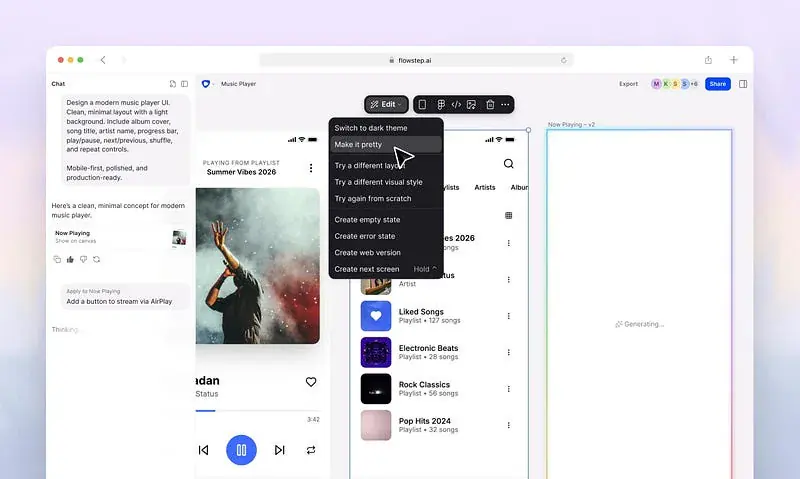
Flowstep is the closest thing to a purpose-built AI design engineer. You describe what you want — a three-screen onboarding flow, a dashboard with live data, a mobile checkout experience — and it generates production-ready UIs on an infinite canvas.
The thing that separates Flowstep from the rest is that it treats design and code as the same thing. There’s no export step or “sync this to your codebase later” friction. You design in Flowstep, and the React/TypeScript/Tailwind output lives in that same place. Real-time collaboration works too, so teams can collaborate in real time.
It also speaks Figma natively. Copy something you built in Flowstep with ⌘C and paste it into Figma with ⌘V, no plugin required.
If you’re doing rapid multi-screen prototyping and need both the visual design and the code to ship together, Flowstep is hard to beat. It also connects via MCP to coding agents like Cursor and Claude Code, so a generated screen can flow straight into your dev environment instead of sitting as an export you have to wire up yourself.
Pricing: Message-based, one prompt = one message. Free tier for trying it out. Starter is \(15/month for 80 messages. Pro is \)29/month for 240 messages. Max is $99/month for 1,000 messages. Enterprise is available for custom needs. Errors don’t count against your message limit.
Best for: Teams that need AI wireframe generator with multi-screen UI generation and clean handoff to production code.

2. Figma Make: Best AI Wireframe Generator for Figma Teams
Website: figma.com
Figma Make is what happens when you add genuine functionality to a tool that 90% of product teams already have open. You describe what you want inside Figma, and Make generates actual interactive prototypes or web applications — not just static mockups.
Here’s what makes it powerful: Make can connect your generated prototypes to Supabase for real backend logic, publish them as working web apps, and sync the result back into Figma Design so your design file and your deployed prototype stay in sync. For teams already living in Figma, that’s a massive efficiency gain. Your component library, design tokens, and team permissions all stay intact. Developers get handoff through Figma’s Dev Mode, which they’re already trained to use.
This isn’t just exploration anymore — it’s a legitimate path from concept to functioning application without leaving Figma. That said, the output still benefits from polish before it ships to production. But the capability is significantly more powerful than it was a year ago.
Pricing: Bundled into Figma’s existing plans. There’s no separate pricing page for Make itself — usage comes out of your general Figma allocation. Higher-tier plans get more generation capacity.
Best for: Teams already embedded in Figma who want to stay there, and design teams that prioritize Figma’s full feature set for complex design systems.
3. Uizard: Best AI Wireframe Generator for Rapid Prototyping
Website: uizard.io
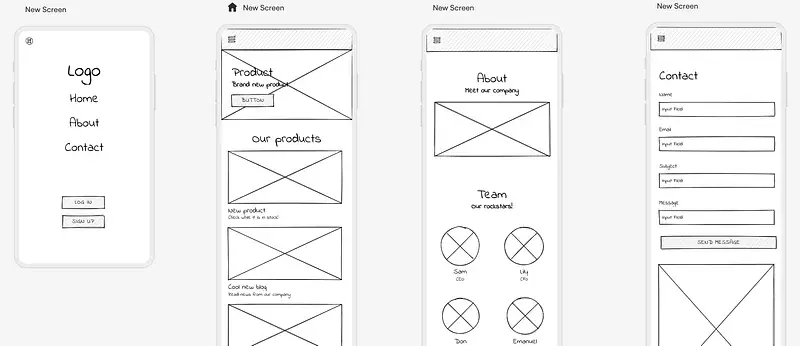
Uizard is one of the AI wireframe generators — it lets you build wireframes and prototypes from sketches, screenshots, and natural language prompts, and it specializes in speed over polish.
The strongest use case for Uizard is when you have a rough idea, a napkin sketch, or a competitor screenshot and need to spin something up fast. Upload an image, describe what you want changed, and Uizard generates a clickable prototype. The generated designs aren’t always production-ready, but they’re good enough for user testing and internal feedback loops.
Uizard also handles collaborative editing and basic prototyping flows — you can link screens together and hand it to stakeholders for feedback before you’ve written a line of code. For early-stage products and design exploration, it’s genuinely useful. For shipping production UI, you’ll want to polish elsewhere.
Pricing: Free tier includes limited generations. Pro plan is $12/month when billed annually, with 500 AI generations per month and React/CSS developer handoff included. Team and enterprise options available for larger teams.
Best for: Solo founders and small teams doing rapid wireframe exploration, user testing, and design feedback loops without worrying about production-ready code yet.
4. Balsamiq: Best AI Wireframe Generator for Low-Fidelity Wireframes
Website: balsamiq.com
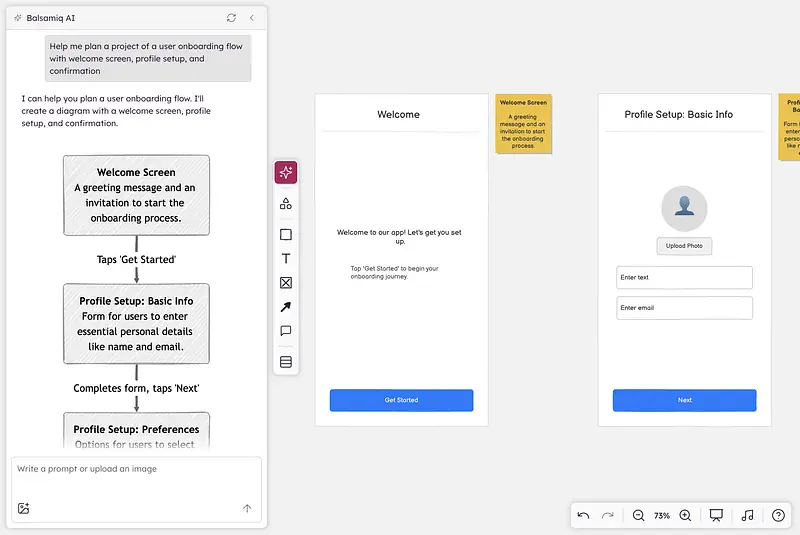
Balsamiq isn’t new — it’s been the scrappy wireframing tool since 2008. But in 2025 and 2026, they added AI features that let you describe what you want and get a wireframe back, rather than clicking together boxes by hand.
The philosophy here is deliberately low-fidelity. Balsamiq’s wireframes look intentionally rough — think marker sketches on paper. That’s actually strategic: it signals to stakeholders that this is for early feedback, not a final design. The AI generation respects that aesthetic, so you get fast, throwaway wireframes that actually discourage endless polishing.
This matters more than it sounds. Balsamiq’s simplicity means there’s no expectation of visual perfection, which actually speeds up feedback cycles. You’re not debating pixels; you’re debating structure and flow.
The output isn’t meant for code export in the way Flowstep or v0 are — Balsamiq is still fundamentally about communication and feedback, not code generation. But it’s incredibly fast, has a generous free tier, and works great for teams that need to nail wireframes before they invest in higher-fidelity design.
Pricing: Free tier is available for solo work. Paid plans are available for teams requiring cloud-based collaboration and advanced features. Check their current pricing page for the latest per-editor and team costs, as they’ve restructured their plans recently.
Best for: Product teams doing upfront wireframe exploration and feedback before design handoff, and anyone who wants to discourage endless iteration on low-fidelity mockups.

5. Bolt.new: Best AI Wireframe Generator for Full-Stack Prototyping
Website: bolt.new
Bolt.new is the full-stack generator. You describe an application — not just a screen, but a whole app with frontend, backend, database, and deployment — and it spins up a working prototype inside your browser using StackBlitz’s WebContainers.
The magic here is that you get a running, interactive app immediately. No local environment setup. No “export and integrate” step. The whole project runs in the browser, you can see it working, iterate on it, and deploy it to Netlify or Vercel with one click.
This is incredible for validation. When you need to prove an idea works before committing to a full production build, Bolt.new cuts the setup time from days to minutes. The generated code is clean enough to read and modify, which means you can actually use it as a foundation rather than starting over.
The limitation is that token consumption scales with project size. As your prototype grows more complex, the per-message cost climbs. It’s optimized for fast MVPs, not for building sophisticated applications.
Pricing: Free tier gives you 1M tokens per month with a 300K daily limit. Pro is $25/month for about 10–13M tokens with no daily cap. Teams and enterprise tiers available. Unused tokens roll over one month.
Best for: Founders and teams validating ideas quickly, demos, and rapid full-stack prototypes that might eventually move to a production codebase.
6. Lovable: Best AI Wireframe Generator for Full-Stack App Development
Website: lovable.dev
Lovable positions itself as the accessible full-stack generator — it’s built for people who aren’t necessarily technical. Describe what you want, iterate through chat, and watch working code appear.
What Lovable does well is conversation-driven iteration. Rather than one big prompt producing one result, you have an ongoing chat with the AI where you can refine, adjust, and explore. It feels less like a code generation tool and more like having a developer sit next to you building what you describe.
The output is production-grade React and TypeScript that actually runs, with Supabase integration for backend logic. That’s more sophisticated than some competitors, which means your prototype can actually become your product if you want it to.
The tradeoff is that it’s heavier on the agentic side of the spectrum — the AI makes more architectural decisions without you explicitly asking, which can produce friction if you have strong opinions about code structure or tech choices.
Pricing: Freemium model with limited credits. Paid plans are credit-based, where credit consumption depends on task complexity and the scope of what you’re building. Costs scale from basic usage to heavy development work. Check their pricing page for current credit costs and plan tiers.
Best for: Non-technical founders and product people building full-stack applications, and teams that want the fastest path from idea to working prototype.
How These Actually Fit Together: The Best AI Wireframe Generator
Here’s the honest truth: you’re not choosing one of these. Most teams using this category are using multiple tools in the same workflow.
You might start with Balsamiq or Uizard for quick wireframe exploration and stakeholder feedback. Once the structure is locked in, you move to Flowstep or Figma Make to get higher-fidelity mockups with code. If you need a full working backend, you jump to Bolt.new or Lovable for a complete prototype you can actually ship or iterate on.
The convergence around code export in 2026 means these aren’t separate disciplines anymore. Wireframing isn’t “design work that developers will later rewrite” — it’s the beginning of actual code. That changes how you think about which tool to reach for at each stage.
Real Talk
AI wireframe generators are genuinely useful, but they’re not magic. A wireframe generated from “a dashboard for tracking sales” still needs thoughtful design decisions about what data matters, how to structure the flows, and what happens when the user gets stuck. An AI generator can produce layout and components faster than a human can, but the thinking about whether you built the right thing — that’s still entirely on you.
And because this category moves fast and pricing and features can change frequently, treat the pricing here as a snapshot. Check directly with each vendor before committing a team to one.
Sources and Further Reading
Flowstep Official Site
Figma Design Tools
Uizard AI Wireframe Generator
Balsamiq Wireframing
Bolt.new Full Stack Generator
Lovable AI Development